
Running out of space on your iPhone can feel frustrating, especially when you’re trying to take photos, download apps, or install updates. If you’re searching for how to buy more storage on iPhone, the good news is that Apple offers simple and flexible options to expand your storage without needing a new device.
In this guide, we’ll break down everything in a clear, practical way so you can free up space, upgrade storage, and keep your iPhone running smoothly.
Can You Really Buy More Storage on iPhone?
First, let’s clear up a common confusion.
You cannot upgrade the internal storage of your iPhone after purchase. For example, if you bought a 64GB iPhone, it stays 64GB forever.
However, you can increase usable storage by:
- Buying iCloud storage
- Managing storage in settings
- Using external or cloud alternatives
So when people search how to buy more storage on iPhone in settings, they are usually referring to iCloud upgrades and storage management tools.
How to Buy More Storage on iPhone Using iCloud
The most common solution is upgrading iCloud storage.
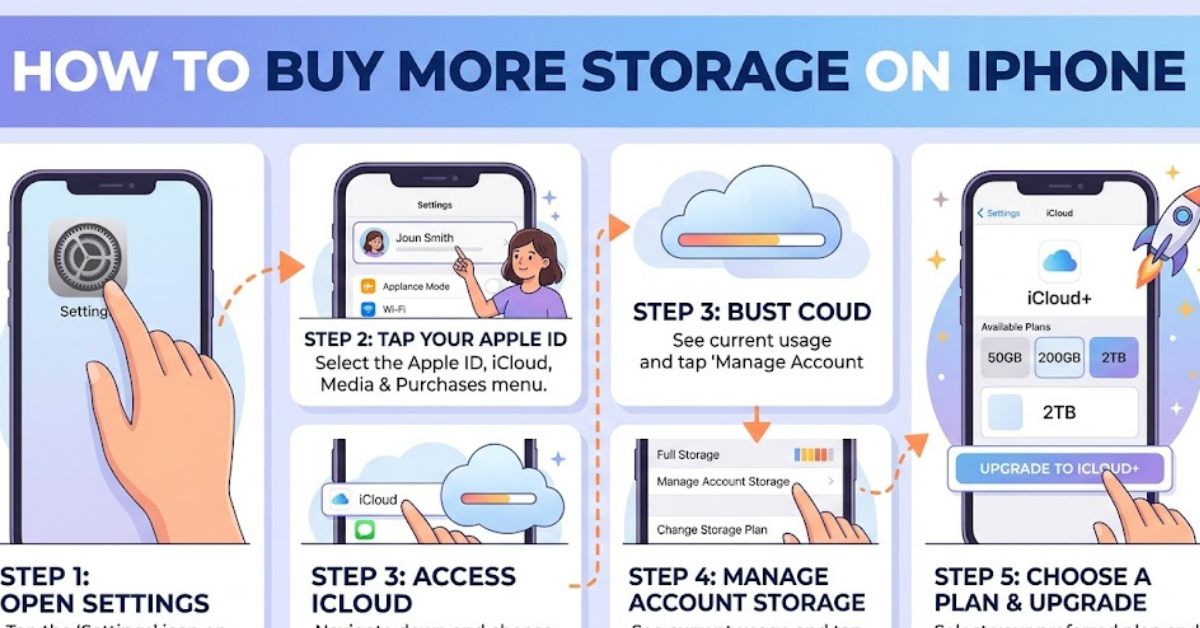
Steps to upgrade iCloud storage:
- Open Settings
- Tap your Apple ID at the top
- Select iCloud
- Tap Manage Storage or iCloud+
- Choose “Change Storage Plan”
- Select a paid plan and confirm
This is the official method for how to buy more storage on iPhone.
Why iCloud storage helps:
- Stores photos and videos safely
- Frees up device space
- Syncs data across Apple devices
- Helps with backups
This is especially useful for how to buy more storage on iPhone for photos or how to buy more storage on iPhone for pictures.
How to Buy More Storage on iPhone Not iCloud
If you are searching for how to buy more storage on iPhone not iCloud, the truth is Apple does not offer internal storage upgrades.
But you still have alternatives:
Alternative storage options:
- External flash drives (Lightning/USB-C compatible)
- Google Drive or other cloud apps
- Transferring files to a computer
- Streaming instead of downloading media
These methods don’t increase internal memory but help manage space effectively.
How to Buy More Storage on iPhone in Settings (Device Management)
Before buying storage, you should check what’s already taking space.
Go to:
- Settings
- General
- iPhone Storage
Here you can:
- Delete unused apps
- Clear large files
- Offload apps automatically
- Review photo and video usage
This is a key step in how to buy more storage on iPhone in settings because sometimes you don’t need to buy storage at all.
Storage Needs for Different iPhone Models
Different iPhone models handle storage issues differently.
iPhone 6, 6 Plus, and 6s
Users searching how to buy more storage on iPhone 6, 6 plus, or 6s usually face low storage limitations due to older hardware.
iPhone 7 and 7 Plus
For how to buy more storage on iPhone 7 or 7 plus, iCloud is the best solution since internal storage cannot be expanded.
iPhone 8 and 8 Plus
Many users searching how to buy more space on iPhone 8 or 8 plus rely heavily on iCloud and app cleanup.
iPhone XS Max
For how to buy more space on iPhone xs max, storage management is usually enough unless you use heavy media apps.
iPhone 11, 12, 15, and 16
Newer devices like iPhone 11, 12, 15, and 16 still benefit from iCloud, especially for photos and 4K videos.
How to Buy More Storage on iPhone for Photos and Updates
Photos and system updates are the biggest storage users.
For photos:
- Enable iCloud Photos
- Store originals in iCloud
- Keep optimized versions on your phone
For updates:
If you’re searching how to buy more space on iPhone for update, try:
- Clearing temporary files
- Deleting unused apps
- Ensuring at least 5–10GB free space
Updates often fail when storage is too low.
How iCloud Storage Plans Work
Apple offers different iCloud storage tiers:
- 5GB (free)
- 50GB
- 200GB
- 2TB
You can upgrade or downgrade anytime based on your needs.
This is the most reliable answer to how to buy more space on iPhone?
Common Storage Problems and Fixes
1. “Storage Almost Full” warning
- Delete large videos
- Offload unused apps
- Clear Safari cache
2. Apps taking too much space
- Reinstall heavy apps
- Clear app data if possible
3. Photos consuming storage
- Move to iCloud or external storage
Best Practices to Avoid Storage Issues
- Regularly check storage in settings
- Use cloud backups
- Avoid storing duplicate media
- Clear downloads folder frequently
These habits reduce the need to constantly search for how to buy more space on iPhone for photos or updates.
FAQs
Can I physically increase iPhone storage?
No, internal storage cannot be upgraded after purchase.
What is the best way to buy more space on iPhone?
Upgrading iCloud storage is the official and easiest method.
Why is my iPhone storage full so fast?
Photos, videos, apps, and system data are usually the main causes.
Does deleting apps free up storage permanently?
Yes, but leftover data may still remain in system storage.
Is iCloud storage worth it?
Yes, especially if you take lots of photos or use multiple Apple devices.
How do I check what is using my storage?
Go to Settings → General → iPhone Storage.
Conclusion
Understanding how to buy more storage on iPhone is less about upgrading physical memory and more about managing space smartly through iCloud and settings. While you cannot expand internal storage, Apple gives you powerful tools to store photos, apps, and backups safely.
Whether you’re using an older device like iPhone 7 or a newer model like iPhone 15, the best approach is combining iCloud storage with smart storage management. This keeps your device fast, organized, and ready for everyday use without constant storage warnings.