Have you ever visited someone’s TikTok profile and immediately wondered whether they would know you were there? You’re not alone. Privacy is one of the biggest concerns for TikTok users, especially as the platform continues to introduce features that increase engagement and visibility.
If you’re wondering how to turn off profile views on TikTok, the good news is that the process is quick and straightforward. Whether you want to browse profiles anonymously or simply keep your activity private, TikTok gives users control over this feature.
In this guide, you’ll learn exactly what Profile View History is, how it works, how to disable it, and what happens after you turn it off. We’ll also cover common questions, troubleshooting tips, and privacy best practices to help you use TikTok with confidence.
What Is TikTok’s Profile Views Feature?
TikTok’s Profile View History feature allows users to see who has visited their profile within the last 30 days. In return, users who enable the feature can also see who viewed their own profiles.
This feature is designed to encourage interaction and help creators understand who’s engaging with their content. However, not everyone is comfortable sharing that information.
How Profile View History Works
When Profile View History is enabled:
- You can see users who viewed your profile in the last 30 days.
- Other users with the feature enabled can see when you visit their profiles.
- Both users must meet TikTok’s eligibility requirements.
When the feature is turned off:
- Your profile visits won’t appear in others’ Profile View History.
- You won’t be able to see who visited your profile.
- Your browsing becomes more private.
Why People Turn Off Profile Views on TikTok
There are several reasons users choose to disable this feature.
Privacy Concerns
Many people simply prefer to browse content without revealing their activity.
Professional Boundaries
Creators, marketers, recruiters, and business owners often research profiles and competitors. Turning off profile views helps maintain discretion.
Avoiding Unwanted Attention
Some users don’t want others knowing they’ve viewed a profile, especially when researching trends, checking old friends, or exploring creator content.
Better Control Over Personal Information
Disabling profile views is one of several privacy settings that can help you manage your digital footprint on TikTok.
How to Turn Off Profile Views on TikTok
The process only takes a few seconds.
Method 1: Turn Off Profile Views From Your Profile
- Open the TikTok app.
- Tap Profile in the bottom-right corner.
- Look for the Footprint or Profile Views icon near the top of the screen.
- Tap the icon.
- Select Settings.
- Toggle Profile View History off.
Once disabled, your profile visits will no longer appear to eligible users.
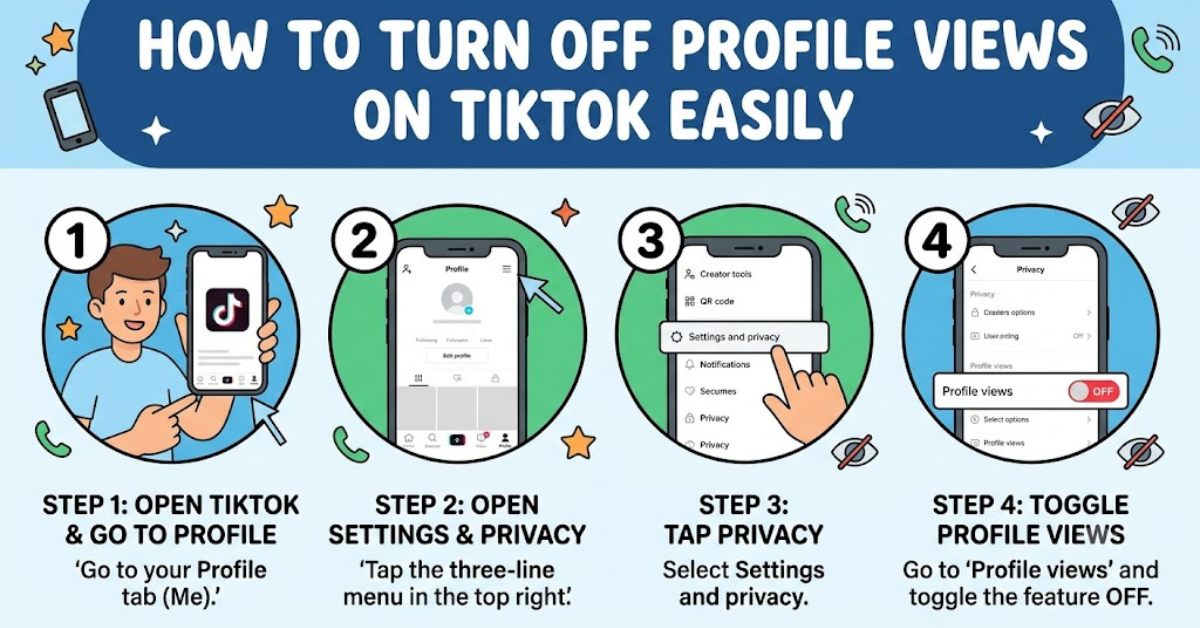
Method 2: Turn Off Profile Views Through Privacy Settings
If you don’t see the Profile Views icon, you can use the settings menu.
- Open TikTok.
- Go to your Profile.
- Tap the Menu (☰) icon in the top-right corner.
- Select Settings and Privacy.
- Tap Privacy.
- Find Profile Views.
- Turn off Profile View History.
The change takes effect immediately.
What Happens After You Disable Profile Views?
Many users worry about what changes after turning off this setting.
Here’s what you can expect:
You Become Invisible in Profile View History
Your profile visits won’t be shown to others who have Profile View History enabled.
You Lose Access to Visitor Information
The trade-off is simple: privacy for privacy.
If you disable Profile View History, you won’t be able to see who viewed your profile either.
Previous Activity May No Longer Be Visible
TikTok generally removes your visibility from Profile View History once the feature is disabled, though exact behavior can vary depending on app updates.
Who Can Use TikTok Profile View History?
Not every TikTok account has access to this feature.
Generally, TikTok limits Profile View History to users who meet specific criteria, which may include:
- Being at least 16 years old
- Having fewer than a certain number of followers
- Using a compatible app version
TikTok occasionally updates eligibility requirements, so availability may vary.
How to Check Whether Profile Views Are Enabled
Not sure if the feature is active?
Look for these signs:
- A footprints icon on your profile page
- A Profile Views notification
- A Profile View History section in Privacy Settings
If the toggle is switched on, the feature is currently active.
Profile Views vs. Post Views: Understanding the Difference
Many users confuse profile views with video views.
Profile Views
- Show who visited your profile.
- Focus on account activity.
- Can be turned on or off.
Post Views
- Show how many people watched your videos.
- Do not reveal the identity of most viewers.
- Remain available regardless of Profile View History settings.
Turning off profile views does not affect video performance analytics.
Additional TikTok Privacy Settings Worth Reviewing
If privacy is important to you, consider adjusting these settings as well.
Make Your Account Private
A private account allows only approved followers to view your content.
Limit Direct Messages
Control who can send you messages.
Options include:
- Everyone
- Friends
- Suggested Friends
- No one
Manage Comments
Filter spam, offensive language, and unwanted interactions.
Control Activity Status
Disable activity status if you don’t want others seeing when you’re online.
Restrict Downloads
Prevent others from downloading your videos when appropriate.
Common Reasons Profile Views May Not Appear
Sometimes users can’t find the Profile Views feature.
Possible reasons include:
- The app needs updating.
- The feature isn’t available in your region.
- Your account doesn’t meet eligibility requirements.
- TikTok is testing new feature variations.
- The feature has been disabled automatically.
Updating the app often resolves missing settings issues.
Tips for Maintaining Privacy on TikTok
To improve your overall privacy experience:
- Review privacy settings regularly.
- Use a strong password and enable two-factor authentication.
- Limit public personal information.
- Be cautious when interacting with unknown accounts.
- Keep your TikTok app updated.
Privacy settings change over time, so occasional reviews are a smart habit.
Key Takeaways
- TikTok’s Profile View History shows who visited your profile in the last 30 days.
- When enabled, profile visits become visible between eligible users.
- Learning how to turn off profile views on TikTok takes only a few taps.
- Disabling the feature hides your profile visits but also removes your ability to see visitors.
- Additional privacy settings can further protect your account and activity.
Frequently Asked Questions
Can people see that I viewed their profile after I turn off profile views on TikTok?
No. Once Profile View History is disabled, your future profile visits generally won’t appear in eligible users’ Profile View History.
Why can’t I find the Profile Views setting on TikTok?
The feature may not be available for your account, your app could need an update, or TikTok may have adjusted eligibility requirements.
Does turning off profile views affect video views?
No. Video views, likes, comments, and other engagement metrics continue to function normally.
Can I turn profile views back on later?
Yes. You can re-enable Profile View History at any time through the Profile Views section or Privacy Settings.
Will turning off profile views make my account private?
No. Profile View History and account privacy are separate settings. You must manually switch to a private account if desired.
How long does TikTok keep profile view history?
TikTok typically stores Profile View History information for up to 30 days for eligible users who have the feature enabled.
Conclusion
Understanding how to turn off profile views on TikTok is essential for anyone who values online privacy. The feature offers transparency, but it also means your profile visits can be visible to others. By disabling Profile View History, you gain more control over your activity and can browse profiles with greater discretion.
Take a few minutes to review your TikTok privacy settings today. A small adjustment can make a big difference in how comfortably and confidently you use the platform.