
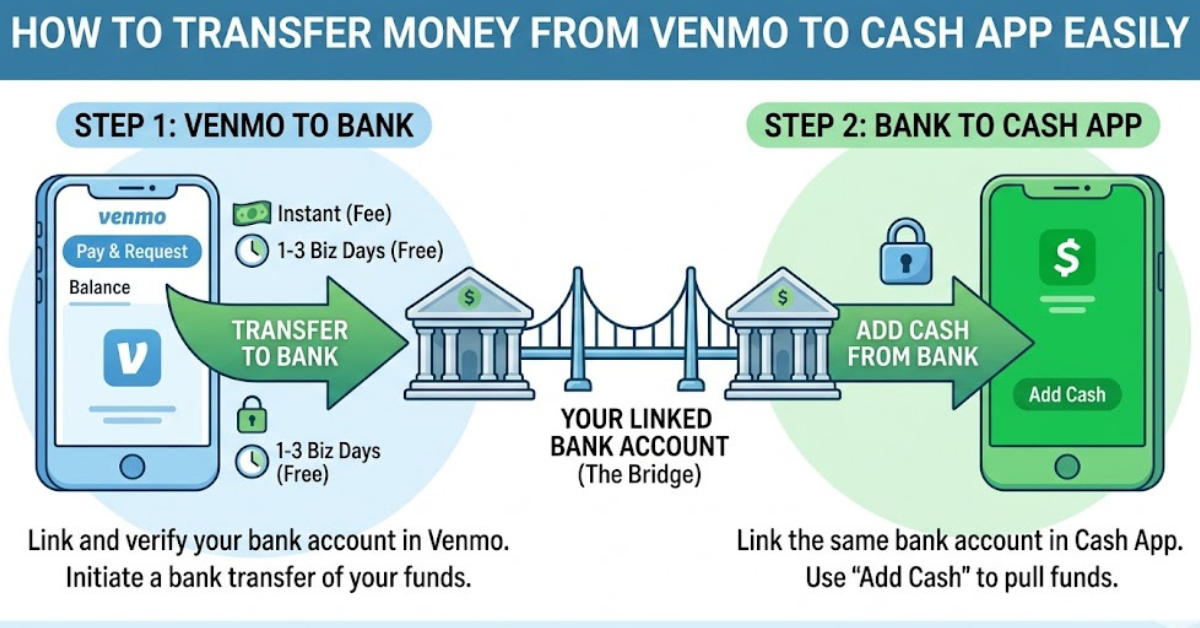
If you’re trying to figure out how to transfer money from Venmo to Cash App, here’s the first thing you need to know: there is no direct way to send money between these two apps. Venmo and Cash App operate as separate payment platforms, so you’ll need a workaround using a linked bank account or debit card.
The good news? The process is still simple once you understand the steps. In this guide, we’ll break down exactly how to move your money safely, quickly, and without unnecessary fees.
Why You Can’t Directly Transfer Money from Venmo to Cash App
Both Venmo and Cash App are peer-to-peer payment services, but they don’t integrate with each other. That means:
- You can’t send Venmo balance directly to Cash App
- There’s no “transfer to Cash App” button in Venmo
- Each app requires an external bank or card to move funds
So, to complete a Venmo to Cash App transfer, you’ll need to use an intermediate step like a bank account.
Method 1: Transfer Money from Venmo to Cash App Using a Bank Account
This is the most reliable and widely used method.
Step 1: Transfer Money from Venmo to Your Bank
- Open the Venmo app
- Tap “Me” (profile icon)
- Select “Add or Transfer”
- Enter the amount you want to move
- Choose Standard (1–3 business days) or Instant Transfer (small fee applies)
- Select your linked bank account and confirm
Step 2: Move Money from Bank to Cash App
- Open Cash App
- Tap the Banking tab
- Select “Add Cash”
- Enter the amount you transferred from Venmo
- Confirm using Touch ID, PIN, or Face ID
Done — your money is now in Cash App.
Method 2: Use a Debit Card Linked to Both Apps
If you don’t want to wait for bank transfers, this method can be faster.
How it works:
- Link the same debit card to Venmo and Cash App
- Withdraw funds from Venmo to the card
- Add money from the card into Cash App
Steps:
- Add your debit card to Venmo and Cash App
- Withdraw Venmo balance to the card
- Open Cash App and select Add Cash
- Choose the same debit card
- Transfer the amount into Cash App
This method may still involve processing time depending on your bank.
Method 3: Instant Transfer Fast but Fee-Based
If speed matters, Venmo’s instant transfer option is useful.
- Transfers to your debit card within minutes
- Typically charges a small percentage fee
- Then you can immediately load Cash App from the same card
This is the fastest way to complete a Venmo to Cash App money transfer, but it’s not free.
Important Tips Before Transferring Money
Before moving funds between apps, keep these in mind:
- Always double-check linked bank accounts
- Avoid using unverified third-party “transfer services”
- Be aware of transfer fees (especially instant withdrawals)
- Make sure your names match across accounts to avoid delays
Common Issues and Fixes
Money not showing in Cash App?
- Wait for bank processing time (up to 3 business days)
- Check if the transfer is still pending in Venmo
Transfer declined?
- Ensure your bank account is verified
- Check if daily limits have been exceeded
FAQs – How to Transfer Money from Venmo to Cash App
1. Can you directly transfer money from Venmo to Cash App?
No, there is no direct transfer option between Venmo and Cash App.
2. What is the fastest way to move money from Venmo to Cash App?
The fastest method is using Venmo Instant Transfer to a debit card, then adding money to Cash App.
3. Is there a fee to transfer money from Venmo to Cash App?
Venmo may charge instant transfer fees. Bank transfers are usually free but take longer.
4. Can I use PayPal instead of a bank for transfers?
You can, but it still requires linking a card or bank account. There is no direct Venmo-to-Cash App bridge.
5. How long does the transfer take?
- Standard bank transfer: 1–3 business days
- Instant transfer: within minutes (fee applies)
Conclusion
Understanding how to transfer money from Venmo to Cash App comes down to one key point: you must use a middle step like a bank account or debit card. While there’s no direct transfer feature, the process is still simple once you know the right method.
If you frequently move money between apps, linking a shared bank account is the easiest long-term solution. For urgent transfers, instant debit card withdrawals can save time.
Now that you know the process, you can move funds between Venmo and Cash App without confusion or delays.