
Have you decided it’s time to leave OnlyFans but aren’t sure where to start? Whether you’re cutting down on subscriptions, taking a break from social platforms, or simply no longer using the service, deleting your account is a straightforward process once you know the right steps.
If you’re searching for how to delete OnlyFans account, this guide walks you through everything you need to know. You’ll learn how to permanently remove your account, what happens to your subscriptions and earnings, common issues users face, and important things to do before deletion.
Understanding What Happens When You Delete an OnlyFans Account
Before proceeding, it’s important to understand the consequences of deleting your account.
When an OnlyFans account is permanently deleted:
- Your profile is removed from the platform.
- Access to purchased content may be lost.
- Active subscriptions are canceled.
- Messages and account data may no longer be accessible.
- Creators lose access to their earnings dashboard and content library.
- The action is generally irreversible after processing.
Because of this, make sure you’ve backed up any important information before deleting your account.
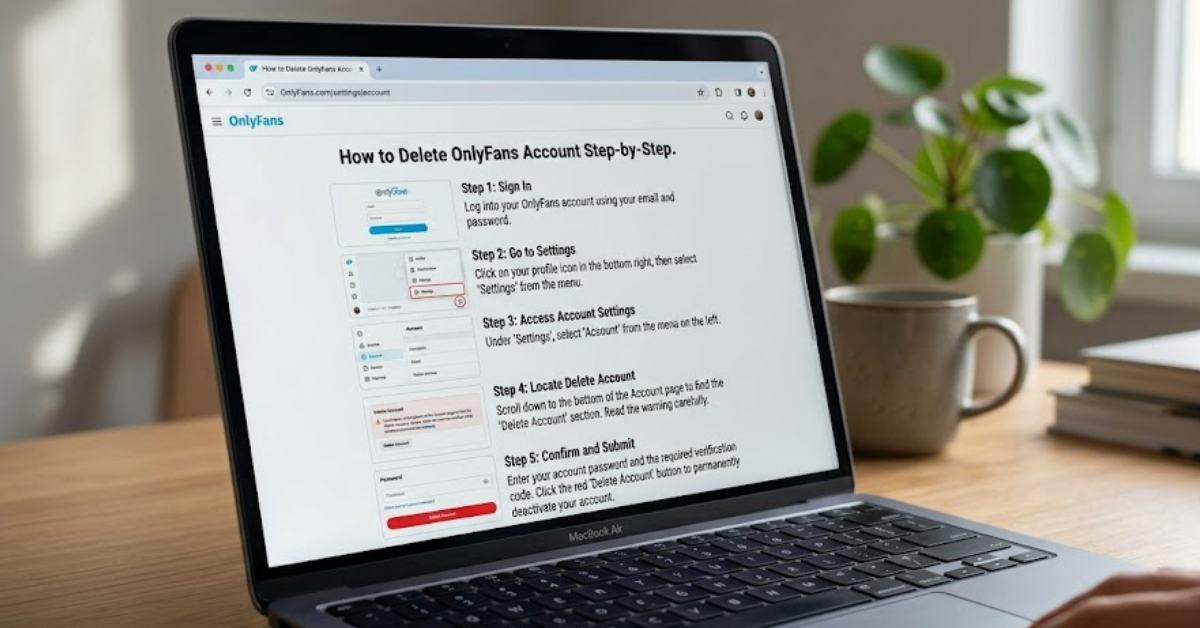
How to Delete OnlyFans Account on Desktop
The process is slightly easier through a web browser.
Step 1: Log In to Your Account
Visit the OnlyFans website and sign in using your credentials.
Step 2: Open Settings
After logging in:
- Click your profile icon.
- Select Settings from the menu.
Step 3: Go to Account Settings
Within Settings, navigate to the Account section.
Scroll toward the bottom of the page where account management options are located.
Step 4: Select Delete Account
Look for the option labeled:
Delete Account
Click it to continue.
Step 5: Complete Security Verification
OnlyFans may ask you to:
- Enter your password
- Complete a CAPTCHA verification
- Confirm your decision
These security measures help prevent unauthorized account deletion.
Step 6: Confirm Deletion
Click the final confirmation button.
Once completed, your account enters the deletion process.
How to Delete OnlyFans Account on Mobile
Many users access OnlyFans through their mobile browser.
The deletion steps are nearly identical:
- Open your mobile browser.
- Visit OnlyFans and sign in.
- Tap your profile icon.
- Open Settings.
- Select Account.
- Scroll down and tap Delete Account.
- Verify your identity.
- Confirm account deletion.
The process works similarly on both Android and iPhone devices.
How Creators Can Delete Their OnlyFans Account
Creators often have additional considerations before closing their accounts.
Withdraw Remaining Earnings
Before deleting your profile:
- Check your current balance.
- Request any available payouts.
- Ensure banking information is up to date.
Many platforms require pending balances to be processed before complete account closure.
Remove Active Subscriptions
Subscribers may lose access immediately after account deletion.
To avoid confusion:
- Inform followers beforehand.
- Announce your departure if appropriate.
- Allow existing subscription periods to conclude if desired.
Save Important Content
Download any content you want to keep, including:
- Photos
- Videos
- Messages
- Earnings records
- Tax-related documents
Once your account is deleted, recovering this information may be difficult or impossible.
How Subscribers Can Delete Their OnlyFans Account
Subscribers generally have a simpler process.
Before deleting:
Cancel Active Subscriptions
Review all active subscriptions.
To do this:
- Open your subscription list.
- Turn off auto-renewal.
- Confirm cancellation.
Although account deletion usually ends subscriptions, manually canceling them first helps avoid billing confusion.
Check Payment History
Consider downloading or reviewing:
- Payment receipts
- Billing records
- Transaction history
This can be useful for personal budgeting or future reference.
Common Reasons People Delete Their OnlyFans Accounts
Users leave the platform for many different reasons.
Some of the most common include:
- Reducing monthly expenses
- Spending less time online
- Privacy concerns
- Changing content interests
- Switching to alternative creator platforms
- Taking a break from social media
Whatever your reason, understanding the deletion process ensures a smooth exit.
Troubleshooting Account Deletion Problems
Sometimes users encounter obstacles while trying to remove their accounts.
Can’t Find the Delete Account Option
If the option isn’t visible:
- Refresh the page.
- Try a different browser.
- Clear browser cache and cookies.
- Ensure you’re logged into the correct account.
Pending Payments Preventing Deletion
Creators with pending earnings may need to:
- Wait for payouts to process.
- Resolve payment verification issues.
- Contact platform support if necessary.
Forgotten Password
If you’ve lost access:
- Use the password reset feature.
- Regain account access.
- Proceed with deletion after verification.
Verification Errors
Security checks can occasionally fail.
Try:
- Refreshing the page
- Disabling browser extensions
- Using another device
- Waiting and retrying later
Should You Deactivate or Delete Your Account?
Many users wonder whether taking a break is better than permanent deletion.
Consider Deletion If:
- You no longer plan to use OnlyFans.
- You want your account permanently removed.
- Privacy is your primary concern.
Consider Waiting If:
- You’re unsure about leaving.
- You may return later.
- You want continued access to purchased content.
Since deletion is often irreversible, take a moment to evaluate your long-term plans.
Privacy Considerations Before Deleting
If privacy is a concern, consider these additional steps:
- Remove profile information before deletion.
- Delete custom profile photos.
- Cancel linked subscriptions.
- Review payment methods.
- Save records for future reference.
These precautions can help ensure a cleaner account closure process.
Key Takeaways
- Deleting an OnlyFans account is done through the Account Settings section.
- Both subscribers and creators can permanently remove their profiles.
- Creators should withdraw earnings before deleting.
- Active subscriptions are generally canceled when an account is removed.
- Download any important data before proceeding.
- Account deletion may be irreversible once completed.
Frequently Asked Questions
How do I permanently delete my OnlyFans account?
Log into OnlyFans, go to Settings > Account, select Delete Account, complete verification, and confirm the deletion request.
Can I delete my OnlyFans account without canceling subscriptions first?
In most cases, deleting the account ends active subscriptions. However, canceling subscriptions manually beforehand can help avoid confusion and ensure billing stops as expected.
How long does it take for OnlyFans to delete an account?
The exact timeline may vary. Some accounts are removed quickly, while others may undergo a short processing period before deletion is finalized.
Can I recover my account after deleting it?
In many situations, permanent deletion cannot be reversed. If you’re uncertain, consider waiting before deleting your profile.
What happens to my purchased content after account deletion?
Access to purchased content may be lost once the account is removed. Save any permitted records or information before deleting.
Why can’t I delete my OnlyFans account?
Common reasons include pending payouts, verification issues, browser problems, or incomplete account requirements. Resolving these issues typically allows the deletion process to continue.
Conclusion
Learning how to delete OnlyFans account is relatively simple once you know where to look. Whether you’re a subscriber looking to stop recurring payments or a creator preparing to leave the platform, following the proper steps helps ensure a smooth and hassle-free experience.
Before deleting your account, remember to cancel subscriptions, withdraw any earnings, save important information, and review your privacy settings. Taking a few extra minutes now can prevent future complications and give you peace of mind as you move on.